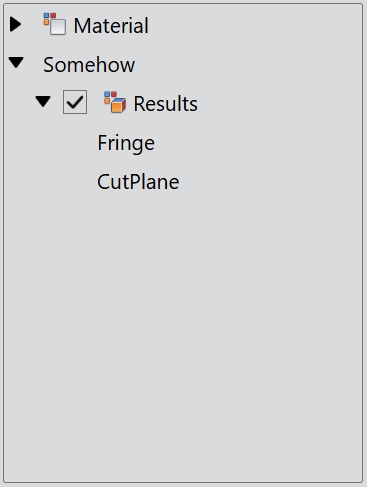
TreeWidget
Detailed Description
The TreeWidget class provides a tree view. The tree widget can be cleared with the clear() function. The tree widget has an invisible root node that can be obtained using the root prpperty.
TreeNode
The TreeNode class provides a node for use with the TreeWidget. A child node can be added with add() or insert(). To clear all children with clear() and remove individual nodes with remove().
Event
The item click event is emitted with the specified node when a mouse button is clicked on a node in the widget.
The item double click event is emitted with the specified node when a mouse button is double clicked on a node in the widget.
The item context menu event is emitted with the specified node when a mouse button is right clicked on a node in the widget.
The selection change event is emitted whenever the selection changes.
The item expand event is emitted when the specified node is expanded so that all of its children are displayed.
The item collapse event is emitted when the specified node is collapsed so that none of its children are displayed.
// Listen for the item click event
treeWidget.bind('itemClicked', (event: ItemClickEvent): void => {
    event.item as TreeNode; // The tree node is clicked.
    event.point; // The position of the mouse pointer relative to the top-left corner of the page.
});
// Listen for the item double click event
treeWidget.bind('itemDoubleClicked', (event: ItemDoubleClickEvent): void => {
    event.item as TreeNode; // The tree node is double clicked.
    event.point; // The position of the mouse pointer relative to the top-left corner of the page.
});
// Listen for the item context menu event
treeWidget.bind('itemContextMenu', (event: ItemContextMenuEvent): void => {
    event.item as TreeNode; // The tree node is right clicked.
    event.point; // The position of the mouse pointer relative to the top-left corner of the page.
});
// Listen for the selection change event
treeWidget.bind('selectionChanged', (): void => {
    // The selection changes.
});
// Listen for the item expand event
treeWidget.bind('itemExpanded', (event: ItemExpansionEvent): void => {
    event.item as TreeNode; // The tree node is expanded.
});
// Listen for the item collapse event
treeWidget.bind('itemCollapsed', (event: ItemCollapseEvent): void => {
    event.item as TreeNode; // The tree node is collapsed.
});
Example code
In the code below, you will create a tree widget:
const desktop = Desktop.instance();
const treeWidget = new TreeWidget(desktop);
treeWidget.size = new Size(240, 320);

const root = treeWidget.root;
const material = new TreeNode(root, 'Material', 'colorBlock_32.png');
new TreeNode(material, 'Water(Fulid)');
const somehow = new TreeNode(root, 'Somehow');
somehow.expanded = true;
const result = new TreeNode(somehow, 'Results', 'appearence_32.png');
result.expanded = true;
result.checkable = true;
result.checked = true;
result.addNode('Fringe');
new TreeNode(result, 'CutPlane');